On this page
- How to Vectorize a Logo in Adobe Illustrator
- Image Trace VS Manual Logo Vectorization:-
- When Is Manual Vector Tracing Better?
- How to Check a Vector Logo
- JPG vs. PNG for Logo Vectorization
- Which Vector File Format Do You Need?
- How Much Does Logo Vectorization Cost?
- DIY or Professional Logo Vectorization?
- Professional Logo Vectorization Service
- Frequently Asked Questions
- Get a Clean, Production-Ready Vector Logo
Learn how logo vectorization converts JPG or PNG artwork into clean, scalable vector files for printing, embroidery, signage, and digital use.
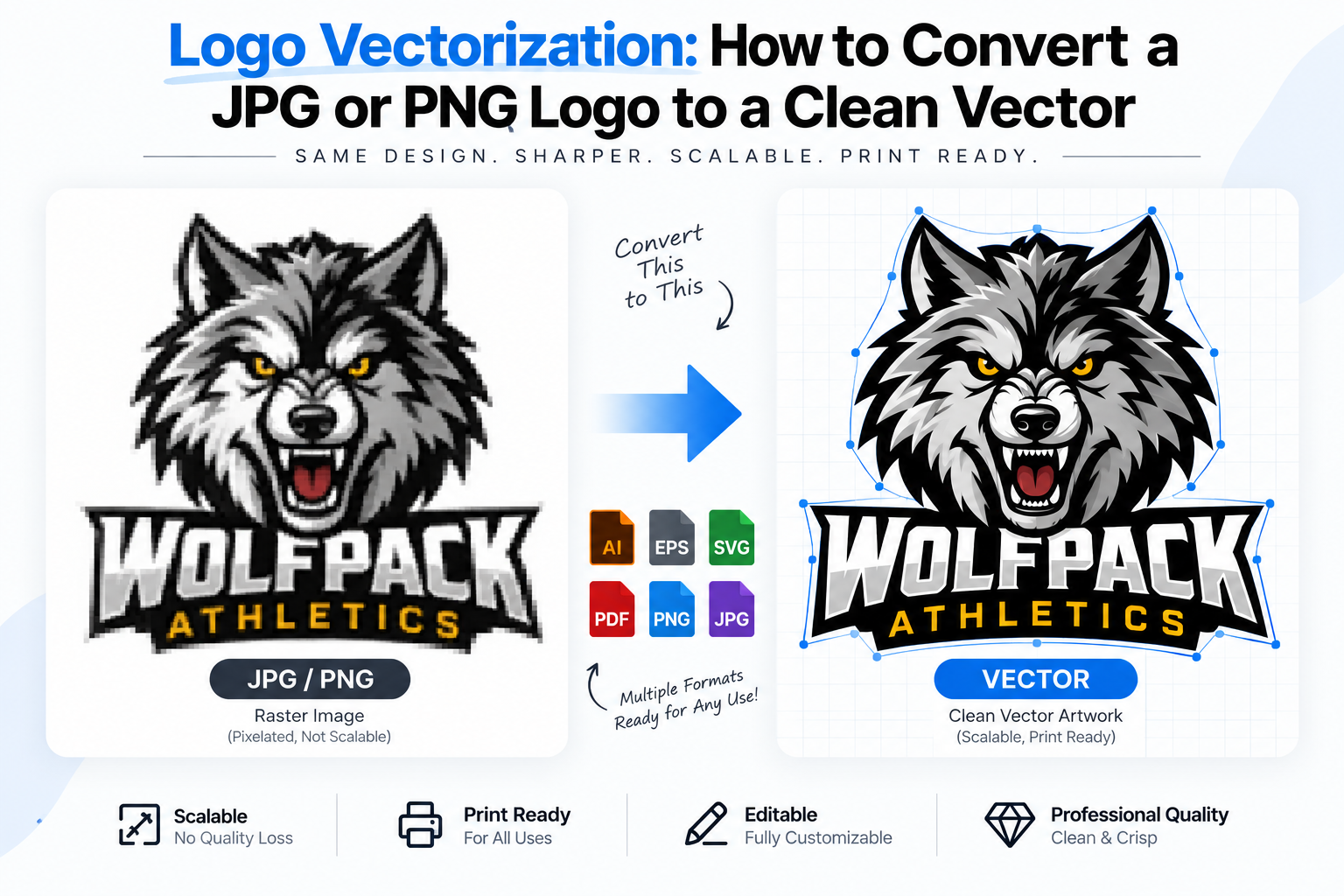
A logo often starts as a JPG or PNG, but raster images are not ideal for professional production. When enlarged, they can become blurry, pixelated, or lose important details.
Logo vectorization solves this problem by rebuilding the artwork as editable vector paths. A properly vectorized logo can be scaled to almost any size while maintaining clean edges and professional quality.
What Is Logo Vectorization?
Logo vectorization is the process of converting a raster logo, such as a JPG or PNG, into a scalable vector graphic using editable paths, curves, shapes, and colors.
Unlike raster images, vector artwork is based on mathematical paths rather than fixed pixels. This makes a vector logo suitable for:
- Large-format printing
- Embroidery
- Screen printing
- T-shirts and apparel
- Business cards and stationery
Common vector formats include AI, EPS, SVG, and vector PDF.
Can You Vectorize a JPG or PNG?
Yes. You can vectorize a JPG or PNG using software such as Adobe Illustrator. However, the quality of the original image matters. A high-resolution, clean logo with simple shapes is generally easier to convert than a small, blurry, compressed image
The basic process is:
JPG/PNG → Trace or Redraw → Clean Paths → Check Artwork → Export Vector Files \
For simple logos, Adobe Illustrator's Image Trace can provide a useful starting point. More complex or brand-critical logos often require manual vector tracing for accurate results.
How to Vectorize a Logo in Adobe Illustrator
1. Start With the Best Available Source
Use the highest-quality version of the logo available. A larger JPG or PNG can provide more useful information about edges, shapes, and typography.
If the only available file is low-resolution, manual reconstruction may be necessary.
2. Place the Logo in Illustrator
Open Adobe Illustrator and place the raster artwork on the artboard. Lock the original image on a separate layer so you can compare the vector artwork with the source.
3. Try Image Trace for Simple Artwork
Illustrator's Image Trace can automatically convert raster artwork into vector paths.
It can work well for logos containing:
- Simple shapes
- Solid colors
- Strong outlines
- Limited detail
- Clean typography
The tracing result should not automatically be considered the final artwork. Excessive anchor points, distorted curves, unwanted shapes, and inaccurate details may require cleanup.
4. Expand and Clean the Paths
After tracing, expand the artwork to convert the result into editable vector paths.
Then inspect:
- Curves and corners
- Anchor points
- Letterforms
- Shapes and proportions
- Colors
- Overlapping objects
- Unwanted background elements
The goal is not simply to create a vector file. The goal is to create a clean, editable vector logo that remains accurate to the original design.
Image Trace VS Manual Logo Vectorization:-
| Image Trace | Manual Vectorization |
|---|---|
| Automatically creates paths | Artwork is rebuilt manually |
| Faster for simple graphics | More control over accuracy |
| Can create unnecessary anchor points | Cleaner path construction |
| May distort small details | Details can be recreated precisely |
| Useful as a starting point | Suitable for professional production |
For a simple logo, Image Trace may save time. For typography-heavy, detailed, low-resolution, or important brand artwork,manual vectorization can provide greater control.
When Is Manual Vector Tracing Better?
Manual logo vectorization is particularly useful when the source image is:
- Low resolution
- Blurry or pixelated
- Small
- Highly compressed
- Typography-heavy
- Detailed or complex
- Needed for professional printing
- Required for embroidery or screen printing
Manual tracing allows the designer to rebuild curves, shapes, typography, spacing, and proportions instead of relying entirely on an automatic algorithm.
This is also commonly called vector tracing, logo redraw, logo recreation, or raster-to-vector conversion.
How to Check a Vector Logo
Before delivering or using a vector logo, inspect it carefully
Check the Paths
The artwork should contain editable vector paths rather than a single embedded raster image.
Check Scalability
Zoom into the logo and inspect curves, corners, and small details. Then enlarge the artwork significantly. Edges should remain clean.
Check Typography
Make sure letters, spacing, alignment, and proportions accurately match the original logo.
Check Colors
Verify that colors are consistent and suitable for the intended production process.
Check the Background
Make sure unnecessary backgrounds or hidden objects have been removed when a transparent logo is required.
A professional vector logo should remain clean and usable across different sizes and production methods.
JPG vs. PNG for Logo Vectorization
Both JPG and PNG can be converted to vector , but they have different characteristics.
JPG:Uses compression and can introduce artifacts around edges. It may be suitable when it is the only available logo source.
PNG: Supports transparency and generally preserves cleaner edges, making it useful when the logo has a transparent background.
However, the original image's resolution and quality usually matter more than simply whether it is JPG or PNG.
Which Vector File Format Do You Need?
Different formats are useful for different applications:
- AI: Adobe Illustrator editing and working file
- EPS: Printing, signage, and professional production
- SVG: Websites, apps, and digital applications
- PDF: Sharing and many print workflows
- DXF: Certain cutting and manufacturing workflows
For professional delivery, providing multiple formats can make the logo more versatile across print and digital applications.
How Much Does Logo Vectorization Cost?
Logo vectorization cost depends on factors such as:
- Logo complexity
- Number of colors
- Amount of detail
- Quality of the original artwork
- Typography complexity
- Required file formats
- Production requirements
- Turnaround time
A simple one-color logo generally requires less work than a detailed logo containing multiple shapes, custom lettering, gradients, or intricate artwork.
DIY or Professional Logo Vectorization?
DIY vectorization can be appropriate when the logo is simple and you are comfortable working with Adobe Illustrator
A professional logo vectorization service can be more suitable when accuracy and production quality are important, particularly for logos used on:
- Apparel
- Packaging
- Signage
- Embroidery
- Screen printing
- Large-format graphics
- Business branding
The important consideration is not simply whether the final file is technically a vector. The artwork should be clean, accurate, editable, and ready for its intended production method.
Professional Logo Vectorization Service
VectorNPrint manually vectorizes logo artwork path-by-path in Adobe Illustrator rather than relying entirely on automatic tracing. The company states that it has 7+ years of tracing experience and 2,500+ completed projects, providing formats such as AI, EPS, SVG, and PDF.
For businesses that need a clean JPG to vector, PNG to vector, logo redraw, or raster-to-vector conversion, professional vector artwork can provide a production-ready foundation for both print and digital applications.
Frequently Asked Questions
Why Should I Vectorize My Logo?
Vectorization makes your logo scalable and editable, allowing it to be used across different sizes and production methods without the pixelation associated with raster artwork.
Can I Convert a JPG Logo to Vector?
Yes. A JPG logo can be converted into editable vector artwork using Adobe Illustrator's Image Trace or through precise manual vector tracing, depending on the complexity of the design.
Can I Convert a PNG Logo to a Vector SVG?
Yes. A PNG logo can be recreated as genuine vector artwork and exported as an SVG file. Simply placing a PNG image inside an SVG file does not make the artwork genuinely vector.
Is Image Trace Good Enough for Logos?
Image Trace can work well for simple logos with clean shapes and limited colors. However, complex or brand-critical artwork may require manual cleanup or complete manual vectorization for accurate results.
What Is the Best Vector Format for a Logo?
AI and EPS are commonly used for professional editing and print production, while SVG is particularly useful for websites and digital applications. Vector PDF is also useful for sharing and printing.
Get a Clean, Production-Ready Vector Logo
A professionally vectorized logo should be accurate, scalable, editable, and ready for real-world use. Whether you need to convert a JPG or PNG, recreate a low-resolution logo, or prepare artwork for printing and embroidery, the quality of the vector construction matters.
llkkll
Need your logo professionally vectorized? VectorNPrint/a> provides manual vector tracing and professional logo vectorization for clean, production-ready artwork.