On this page
- Vector vs raster: the one difference that matters
- AI (Adobe Illustrator)
- EPS (Encapsulated PostScript)
- SVG (Scalable Vector Graphics)
- PDF (Portable Document Format)
- PNG (Portable Network Graphics)
- Vector file formats compared
- How to tell if your file is really a vector
- Is EPS a vector file?
- Is PNG a vector file?
- Is PDF a vector file? (And what is a vector PDF?)
- Is SVG a vector file?
- Is JPG a vector file?
- AI vs EPS: what is the difference?
- EPS vs SVG: which should you use?
- SVG vs PNG: which is better for a logo?
- Types of vector files: the full list
- Which one do you need?
- Frequently Asked Questions
AI, EPS, SVG, PDF and PNG all look like "logo files", but they are very different inside. Some hold real vector shapes that stay sharp at any size. Others are just pixels. Some can be edited, some can only be printed. This guide explains what each format actually is, so the names on your files finally make sense.
Just need to know which file to send your printer or web designer? See Which Logo File Format Do I Need?
Get a free quote → 💬 WhatsApp us
Vector vs raster: the one difference that matters
Every image file is one of two kinds:
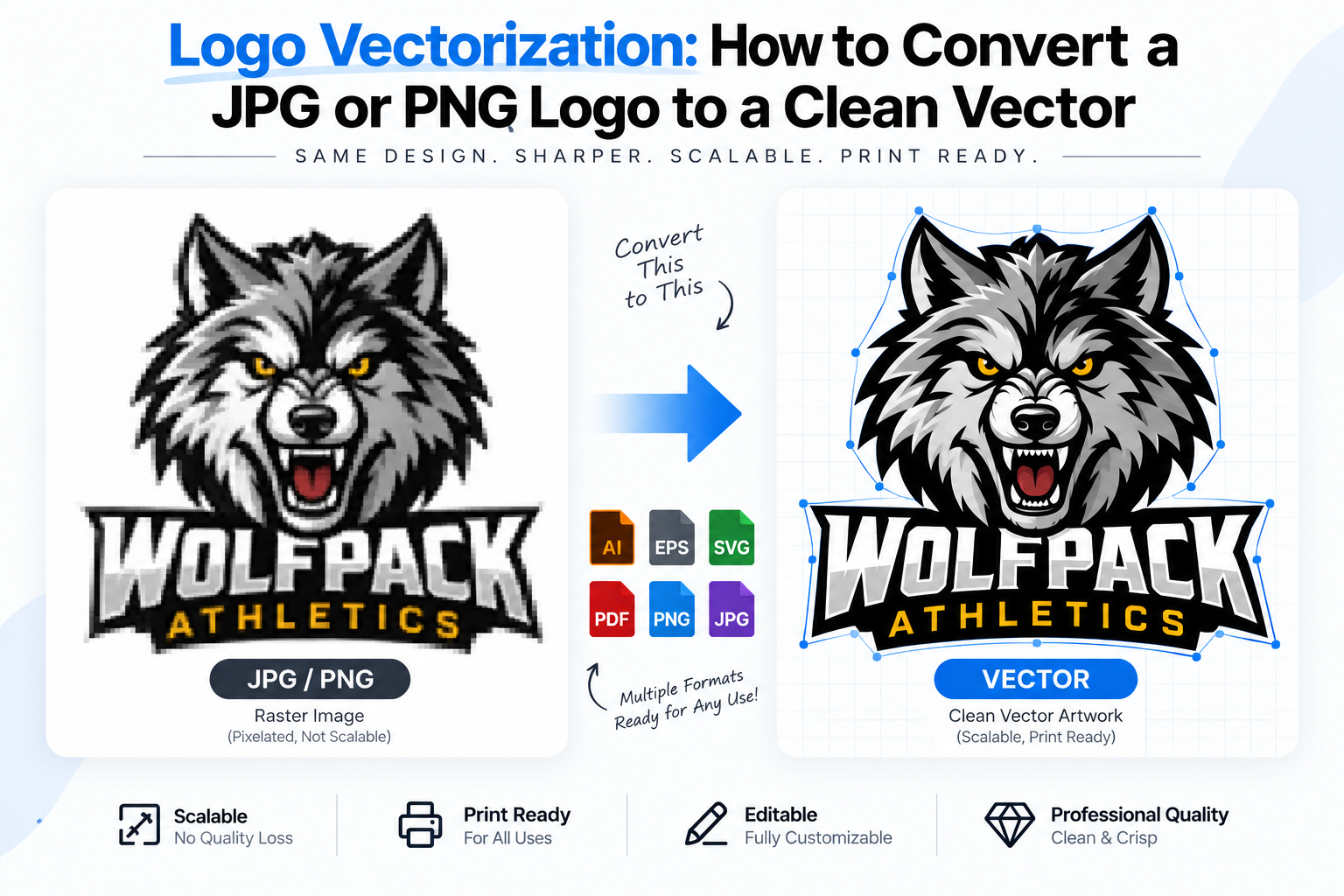
- Vector: the image is stored as shapes: points, lines and curves described with maths. You can scale it from a business card to a billboard and the edges stay perfectly sharp. Colours and shapes can be edited one by one.
- Raster (bitmap): the image is stored as a grid of coloured pixels. It looks fine at its original size, but when you enlarge it, the pixels get bigger and the edges turn blurry or jagged. JPG and PNG are raster formats.
Printers, sign makers, embroiderers and cutting machines need vector artwork because they work at large sizes or follow the outlines of each shape.
AI (Adobe Illustrator)
AI is the working file of Adobe Illustrator, the program most logos are made in. It keeps everything editable: layers, colours, text, gradients and artboards.
- Vector: yes
- Opens in: Adobe Illustrator (some other design programs can open it too, with limits)
- Good to know: this is your master file. Keep it safe, because every other version can be made from it.
Get a free quote → 💬 WhatsApp us
EPS (Encapsulated PostScript)
EPS is an older vector format that almost every print shop, sign maker and embroidery digitizer can open. That is why it is still so common.
- Vector: yes, if it was saved from vector artwork
- Opens in: Illustrator, CorelDRAW and most professional print software
- Good to know: EPS does not handle transparency effects well; they are flattened when the file is saved.
SVG (Scalable Vector Graphics)
SVG is the vector format of the web. It is a small text file that browsers draw directly, so logos and icons stay sharp on every screen.
- Vector: yes
- Opens in: any web browser, design programs, and cutting machines such as Cricut and Silhouette
- Good to know: ideal for websites and vinyl cutting; print shops usually prefer PDF, EPS or AI.
PDF (Portable Document Format)
PDF can hold vector shapes, pixel images, or both. It opens on any computer, which makes it the easiest file to send to a printer.
- Vector: only if it was saved from vector artwork
- Opens in: any PDF reader; editable in Illustrator
- Good to know: a PDF made from a JPG or a screenshot is still just pixels inside, even though it is a PDF.
PNG (Portable Network Graphics)
PNG is a raster format with one big advantage: it can have a transparent background. That makes it the go-to file for websites, social media, slides and documents.
- Vector: no
- Opens in: everything
- Good to know: make it large (for example 3000 px wide) so it stays sharp; it cannot be scaled up without losing quality.
JPG is similar to PNG but has no transparency and loses a little quality every time it is saved. It is fine for photos, not ideal for logos.
Vector file formats compared
| Format | Vector? | Transparent background | Editable | Typical use |
|---|---|---|---|---|
| AI | Yes | Yes | Fully | Master file for designers |
| EPS | Yes* | Limited | Yes | Print shops, signs, embroidery |
| SVG | Yes | Yes | Yes | Websites, cutting machines |
| Yes* | Yes | In Illustrator | Sending to printers | |
| PNG | No | Yes | No | Web, social, documents |
| JPG | No | No | No | Photos |
*Only when saved from real vector artwork.
Get a free quote → 💬 WhatsApp us
How to tell if your file is really a vector
A file ending in .eps, .pdf or .svg is not automatically a vector. If someone placed a JPG inside and saved it as EPS or PDF, it is still pixels. Two quick checks:
- Zoom in: open the file and zoom to 800% or more. Real vector edges stay crisp; pixel images turn blocky or blurry.
- Outline view: in Illustrator, press Ctrl+Y (Cmd+Y on Mac). A vector logo shows the outlines of every shape; a pixel image shows only an empty box.
If your logo turns out to be pixels inside, it needs to be redrawn as a real vector. Converting it with an auto-trace tool usually gives lumpy edges and wrong shapes, which is why we redraw logos by hand in Adobe Illustrator.
Is EPS a vector file?
Usually, yes. EPS was designed for vector artwork, and an EPS saved from Illustrator or CorelDRAW holds real vector shapes. But an EPS can also hold a pixel image. If someone opened a JPG in Photoshop and saved it as EPS, the file is still just pixels, even though the extension says EPS.
To check, open the EPS in Illustrator and switch to Outline view (Ctrl+Y on Windows, Cmd+Y on Mac). Real vector artwork shows thin outlines of every shape. A pixel image shows as an empty box with an X through it.
Is PNG a vector file?
No. PNG is always a raster file: a grid of pixels. Its big advantage is the transparent background, which is why logos are so often shared as PNG. But a PNG cannot be scaled up without the edges going soft or blocky.
Renaming a PNG or saving it as SVG does not make it vector. The shapes have to be traced or redrawn as real lines and curves. The vector equivalent of a PNG for the web is SVG.
Is PDF a vector file? (And what is a vector PDF?)
It depends on what is inside. PDF is a container. It can hold vector shapes, pixel images or both. A vector PDF is one saved from vector artwork, for example exported from Illustrator, so the logo inside is made of shapes.
A PDF made from a scan, a screenshot or a JPG is not vector. It is a picture inside a PDF. Printers reject these often, and it is one of the most common file problems we see. Zoom in to 800% or more: if the edges stay sharp, it is a vector PDF; if they turn into squares, it is not.
Is SVG a vector file?
Yes, normally. SVG stores shapes as code, so it stays sharp on every screen. But watch out for one trap: many free "PNG to SVG" converters simply wrap the original pixel image inside an SVG file. It ends in .svg, yet it is still a PNG inside. If your SVG looks blurry when you zoom in, that is what happened.
Is JPG a vector file?
No. JPG is a raster format, like PNG, but with no transparent background and a little quality loss every time it is saved. It is fine for photos. For logos, ask for a vector file plus a PNG.
AI vs EPS: what is the difference?
Both are vector formats made by Adobe, and both work for print. The difference is how much they keep.
| AI | EPS | |
|---|---|---|
| Editing | Keeps everything: layers, artboards, effects, editable text | Keeps shapes and colours, flattens many effects |
| Transparency | Full support | Limited, flattened on save |
| Who can open it | Illustrator, and some other programs with limits | Almost every print shop, sign maker and digitizer |
| Best for | Your master file, future edits | Sending to suppliers who ask for "a vector file" |
In short: keep the AI as your master, and send EPS (or a vector PDF) to anyone who asks for a vector and does not say which kind.
EPS vs SVG: which should you use?
Both are vector. EPS is the print industry's format: print shops, sign makers and embroidery digitizers open it without problems. SVG is the web's format: browsers display it directly, and cutting machines like Cricut and Silhouette use it. For a printer, send EPS or PDF. For a website or a vinyl cutter, use SVG.
Get a free quote → 💬 WhatsApp us
SVG vs PNG: which is better for a logo?
| SVG | PNG | |
|---|---|---|
| Type | Vector | Raster |
| Scaling | Sharp at any size | Sharp only up to its pixel size |
| Transparent background | Yes | Yes |
| File size | Usually very small for logos | Grows with the pixel size |
| Best for | Websites, apps, cutting machines | Social media, documents, slides, DTF printing |
For a logo on a website, SVG is the better choice because it stays crisp on every screen. For places that do not accept SVG, such as many social media platforms and office documents, use a large PNG made from the vector.
Types of vector files: the full list
AI, EPS, SVG and PDF are the vector file types you will meet most often, but there are others:
- AI: Adobe Illustrator's working file.
- EPS: the print industry's long-standing vector format.
- SVG: the vector format for websites and cutting machines.
- PDF: vector only when saved from vector artwork.
- CDR: CorelDRAW's working file, common in sign shops.
- DXF: a CAD format used by laser cutters, CNC machines and some vinyl cutters.
- AFDESIGN: Affinity Designer's working file.
Common raster (pixel) formats, for comparison: JPG, PNG, GIF, WEBP, TIFF and BMP. A Photoshop PSD is mostly pixels too, even though it can contain some vector shapes.
Which one do you need?
That depends on where the logo is going: a printer, a website, a sign or an embroidery machine. We cover that use by use in Which Logo File Format Do I Need?
Get a free quote → 💬 WhatsApp us
Frequently Asked Questions
Which vector file format is best for printing?
AI, EPS or a vector PDF. Most printers accept all three. If they do not say, a vector PDF is the easiest to open, and EPS is the safest for sign shops and embroidery digitizers.
Which format is best for a logo on a website?
SVG, because it stays sharp on every screen and is usually a very small file. Keep a large transparent PNG too, for places that do not accept SVG.
Can I turn a PNG into a vector by saving it as SVG?
No. Saving or renaming a PNG as SVG only wraps the pixels in a new file type. To get a real vector, the shapes have to be traced or redrawn as lines and curves.
Can I open an AI file without Illustrator?
Often you can view it. Illustrator saves AI files with a PDF-compatible copy by default, so many PDF readers can display them. To edit the artwork you need Illustrator or another vector program, and some features may not carry over.
Is a vector file the same as a high-resolution file?
No. A high-resolution PNG or JPG is still made of pixels, so it has a size limit. A vector has no resolution at all and stays sharp at any size. From a vector you can export a high-resolution PNG whenever you need one.
Which vector formats do you deliver?
Every logo we redraw comes as AI, EPS, SVG and PDF, plus a transparent PNG. DXF cut files and other formats are added on request.